
- This page was last modified on 22 October 2026, at 08:52. Suggest an edit.
iPad Air (M4) facts for kids
 |
|
| Also known as | iPad Air (8th generation) iPad Air 8 |
|---|---|
| Developer | Apple |
| Manufacturer | Foxconn |
| Product family | iPad Air |
| Type | Tablet computer |
| Generation | 8th |
| Introductory price | 11-inch: US$599 13-inch: US$799 |
| Operating system | Original: iPadOS 26.3 Current: iPadOS 27.0.1, released September 28, 2026 |
| Memory | 12 GB |
| Storage | 128 GB, 256 GB, 512 GB, 1 TB |
| Display | 11 inches (280 mm) (2,360 x 1,640) px (264 ppi), 500-nits max brightness 13 inches (330 mm) (2,732 x 2,048) px (264 ppi), 600-nits max brightness Wide-color (P3), true tone, fully laminated display, with support for Apple Pencil Pro and Apple Pencil (USB-C) |
| Camera | Front: 12 MP Rear: 12 MP |
| Connectivity | Wi-Fi 7, Bluetooth 6, sub‑6 GHz 5G |
| Weight | 11-inch: 464 g (1.02 lb) (Wi-Fi) 465 g (1.03 lb) (Wi-Fi + Cellular) 13-inch 616 g (1.36 lb) (Wi-Fi) 617 g (1.36 lb) (Wi-Fi + Cellular) |
| Predecessor | iPad Air (M3) |
The eighth-generation iPad Air, also known as the iPad Air (M4), is a powerful tablet computer. It was designed and created by Apple. Apple announced this modern device on March 2, 2026. Stores began selling it to eager shoppers on March 11, 2026. This shiny model replaced the older iPad Air (M3) in the popular iPad Air family. The tablet is built by Foxconn for technology fans around the globe. It lets users play fun games, draw colorful pictures, and complete homework projects with ease.
Contents
Key Features of the iPad Air M4
The tablet comes packed with modern tools that make it simple and fun to use. It gives learners and digital artists a helpful touchscreen gadget for school, artistic hobbies, and play.
Computer Brain and Fast Memory
Inside the gadget sits a tiny electronic computer brain called the M4 chip. This chip processes instructions quickly. Apple shared that this chip runs up to 30 percent faster than the previous M3 chip. It is also more than two times faster than the older M1. Because of this extra power, video games look smooth and heavy educational programs run without freezing.
Every model holds 12 gigabytes of unified memory. Memory helps the computer remember what you are doing right now. The device also offers plenty of local storage space. Buyers can pick sizes like 128 gigabytes, 256 gigabytes, 512 gigabytes, or even 1 whole terabyte. That is enough room to save thousands of family photos, music tracks, and school worksheets.
Bright Display Screens and Sound
Buyers can select between two screen sizes to match their daily needs. There is a smaller 11-inch display and an expansive 13-inch display. Both screens use sharp pixels so letters, videos, and games look clear. The glass features True Tone technology and wide color support. These tools automatically balance the colors to look natural in bright sunlight or soft bedroom lighting.
The casing features four speaker grilles carved into the metal sides. However, sound only flows through two speakers inside the body. This setup still produces clear music when listening to educational podcasts, cartoons, and songs.
Connected Cameras and Wireless Tech
Taking photos and chatting with relatives is simple on this tablet. The machine has a 12-megapixel camera on the back for photos and videos. It also has a front-facing 12-megapixel camera. The front camera uses Center Stage to keep you centered on screen during video calls.
The tablet connects to local home networks using superfast Wi-Fi 7 technology. It handles modern Bluetooth devices like cordless headphones. Some special models also connect to cellular networks through speedy 5G signals. It uses a helpful USB port to recharge the battery. Unlike more expensive models, it does not use Face ID to scan your face.
Operating Software and Useful Tools
The tablet runs on an operating system called iPadOS 26.3. This software provides the Liquid Glass visual design and neat organization options like the Preview app. Users can download safe programs from the App Store, explore books on Books, listen to tunes through the iTunes Store, and save files safely with iCloud. Gamers can connect with buddies on Game Center and enjoy titles on Apple Arcade.
Creative students can write notes and paint using an optional stylus pen. The device works nicely with both the Apple Pencil (USB-C) and the Apple Pencil Pro. For typing reports, owners can snap on the Magic Keyboard for iPad Air to turn the screen into a mini laptop.
Timeline
| Timeline of iPad models |
|---|
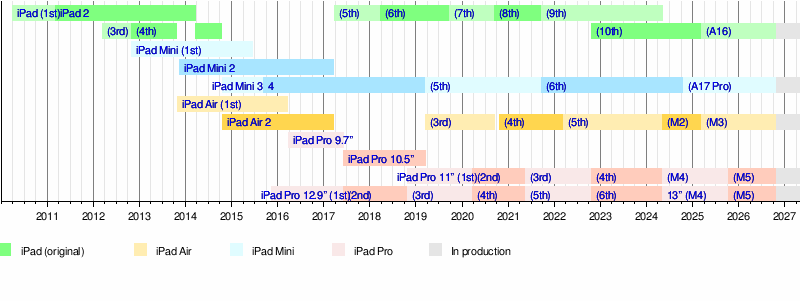 |
Source: Apple Newsroom Archive.