
Data center facts for kids

A data center is a specialized building or large room used to house computer systems and related hardware. These facilities store, process, and transmit digital data around the world. Whenever a person streams a video, plays an online game, uses a search engine, or interacts with artificial intelligence (AI), the request travels to a data center.
Inside these facilities, thousands of powerful computers called servers work day and night. The Energy Independence and Security Act of 2007 describes a data center as a facility containing electronic equipment used to process, store, and manage information. Early forms of these facilities trace back to the 1940s with giant systems like the ENIAC computer.
Modern data centers require massive amounts of electricity, cooling infrastructure, network cables, and physical security. As internet services and AI tools expand, understanding how data centers function and manage their environmental footprint has become an important topic.
Contents
Types of Data Centers and How They Operate

Data centers come in various sizes and serve different organizational goals based on computing power and location needs.
| Type | Typical Power Scale | Primary Purpose | Key Characteristic |
|---|---|---|---|
| Enterprise | 1–10 MW | Internal company operations | Owned and operated by a single organization |
| Colocation | 10–100 MW | Shared rental space | Multiple customers rent space, cooling, and power |
| Hyperscale | 100+ MW | Cloud platforms and AI | Massive scale; run by major technology firms |
| Edge | 1–10 MW | Fast local processing | Located close to users to cut down lag |
Enterprise Facilities
Enterprise data centers are built and operated by a single company for its own internal business needs. In the early 2000s, most major organizations kept their own servers on site. However, running private facilities can be expensive and inefficient. Cooling alone can take up over 30% of their electricity. By 2023, many companies moved their workloads to large shared or cloud providers, leaving enterprise facilities with a smaller share of global computing.
Colocation Centers
A colocation facility acts like an apartment building for servers. The owner provides the physical building, electrical connections, cooling systems, and physical security. Other businesses rent space inside rows of cabinets or cages to install their own server hardware.
Colocation centers let companies cut costs through shared systems while keeping control over their equipment. Major operators like Equinix and Digital Realty run massive facilities worldwide. These centers often host major connection points where regional networks and undersea fiber-optic cables link together.
Hyperscale Facilities
Hyperscale data centers are giant campuses built for massive computing power, often exceeding 100 megawatts (MW) of electricity. They are built and run by large cloud computing companies such as Amazon Web Services, Microsoft Azure, and Google Cloud Platform.
By 2024, there were over 1,100 operational hyperscale facilities globally. These centers power modern web applications and train large artificial intelligence models. While an average data center uses as much power as 100,000 homes, next-generation hyperscale sites can use twenty times that amount.
Edge Facilities and Micro Centers
Edge data centers are smaller sites positioned close to end users and data collection points. Placing computers physically closer to users reduces latency, which is the delay in sending and receiving data signals.
Edge computing supports time-sensitive technologies such as autonomous vehicles, factory automation, smart appliances, and 5G mobile networks. Micro data centers are compact, self-contained units that can be placed in urban areas, next to cell towers, or inside standard shipping containers.
Modular and Portable Systems

Modular data centers use pre-assembled, standardized parts that can be quickly deployed or moved. Entire server rooms can be built into shipping containers.
These setups help companies recover after natural disasters by providing emergency processing power. Mobile units can also transport massive volumes of data physically when network connections are limited.
History and Growth of Computing Facilities

The history of data centers reflects the evolution of modern computer technology.
Early Mainframe Era
In the 1940s and 1950s, early supercomputers like ENIAC occupied entire rooms. These systems used vacuum tubes and thousands of feet of wiring. Because these machines were sensitive to dust, heat, and humidity, engineers designed specialized rooms with strong air conditioners and elevated floors to route cables cleanly.
The Microcomputer Shift and Network Standards
During the 1980s, the rise of desktop microcomputers transformed business operations. Companies began networking computers together in structured server rooms. Standardized 19-inch racks were adopted to hold stacked hardware, making it easier to manage hundreds of cables and machines in a neat order.
The Internet and Cloud Boom
During the late 1990s dot-com era, internet use surged, creating an urgent demand for round-the-clock online reliability. Companies built Internet Data Centers (IDCs) with redundant internet feeds to prevent network downtime. In the 2010s and 2020s, the rapid adoption of video streaming, cloud storage, smartphone apps, and artificial intelligence expanded data center construction globally.
Design, Architecture, and Key Systems

Data centers must provide constant, uninterrupted service, a concept called high availability. Every major component is designed with safety backups.
Power Reliability and Backup Generators


Computers inside a data center cannot lose power even for a fraction of a second. Facilities use multiple independent power feeds from the electric grid.
If the primary power grid drops, large banks of uninterruptible power supplies (UPS batteries) take over instantly. Within seconds, on-site diesel generators or natural gas turbines start up to supply continuous electricity until grid power is restored. Systems use redundancy, meaning secondary backup machines stand ready if any primary equipment fails.
Cooling and Environmental Controls


Servers produce massive amounts of heat when processing data. If temperatures rise too high, silicon chips can overheat and fail.
- Hot and Cold Aisles: Server racks are arranged in rows facing each other. Cold air is pumped into the "cold aisle" in front of the machines. The servers pull in the cold air, cool their components, and blow hot exhaust out into the "hot aisle" behind them.
- Raised Floors: Many rooms use raised floors made of removable tiles. The empty space beneath the floor acts as a conduit to push chilled air directly through perforated tiles to the server intakes.
- Liquid Cooling: Modern AI chips run hotter than older processors, leading many facilities to pipe cooling liquids directly over computer chips to draw heat away efficiently.
- Humidity Control: Keeping air humidity balanced prevents static electricity when air is dry, while avoiding moisture buildup on electronics when air is humid.
Fire Suppression Systems

Standard water sprinkler systems can damage delicate electronics. While water misting systems are sometimes used in corridors, server rooms rely on gaseous fire suppression systems.
These setups use specialized gases like FM-200 or inert gas mixtures. When smoke sensors detect a fire, the system floods the room with gas to extinguish the flames quickly without leaving water residue or harming computer circuits.
Physical Security and Monitoring
Data centers protect valuable hardware and private personal information. Access to the facility is heavily controlled through several security layers:
- High security fencing, barriers, and vehicle checkpoints
- Video surveillance monitoring entryways and server rows
- Biometric scanners, such as fingerprint or iris readers
- Mantrap doors that only open one at a time to prevent unauthorized entry
- Detailed digital logs recording every entry into the server aisles
Lights-Out Operations
A "lights-out" data center is an automated facility designed to run without humans on site. Engineers manage all software, updates, and configurations remotely. Because technicians are not working in the room daily, the facility can run in the dark, cutting energy use and reducing the chance of human error.
Network Infrastructure


Data centers use complex network systems to move information quickly. High-speed fiber-optic cables link individual servers to central switches and routers.
Security appliances like firewalls and intrusion prevention systems inspect incoming and outgoing traffic to block cyber threats. Multiple fiber connections link the facility to outside internet service providers so the network stays connected even if one cable is damaged.
Energy Use and Environmental Footprint

Because data centers run continuously, their electricity and water consumption has become an important topic for environmental scientists, governments, and local communities.
Electricity Demand
Running thousands of servers and giant cooling fans requires huge amounts of electrical power. Globally, data centers use hundreds of terawatt-hours (TWh) of electricity every year, representing around 1.5% to 3% of all global electricity consumption.
Much of this electricity comes from traditional energy grids that rely on natural gas, coal, nuclear power, and renewable energy like solar and wind. To cut emissions, several major technology companies purchase renewable energy credits, contract with solar and wind farms, or look into small modular nuclear reactors to power their sites cleanly.
Water Usage for Cooling
Many large data centers rely on evaporative cooling towers to keep servers cool. In these systems, water evaporates into the air to carry away excess heat, similar to how human sweat cools the skin.
A large data center can consume hundreds of thousands of gallons of fresh water every day. In dry regions, this consumption can put pressure on local drinking water supplies and agriculture. In response, operators are experimenting with dry cooling systems, using treated recycled wastewater, or building facilities in colder northern climates where outside air can cool the servers directly.
Hardware Life Cycles and Electronic Waste
Computer chips and storage drives improve rapidly. Data centers often replace their servers every 3 to 5 years to keep up with faster technology.
This regular turnover produces electronic waste (e-waste). Obsolete equipment contains useful metals like gold and copper, but also hazardous materials like lead. Facility operators work with recycling companies to securely erase old hard drives and recover valuable materials responsibly.
Noise and Community Impact
Data center cooling towers and ventilation fans run continuously, creating a constant low hum or whirring noise. When facilities are built near residential neighborhoods, local residents sometimes raise concerns about noise, landscape changes, and heavy utility demands. In response, local governments often review building rules, requiring sound barriers, tree buffers, and utility planning before approving new projects.
The Future of Data Centers
Researchers are designing new types of computing facilities to solve energy and space challenges.
Next-Generation Data Center Technologies
- Underwater Facilities: Companies have tested placing sealed server capsules on the ocean floor, where natural cold seawater cools the equipment without using fresh water.
- Space-Based Computing: Engineers have studied whether small satellites in Earth orbit could process satellite imagery directly using solar power, though cosmic radiation and heat dissipation in space remain technical hurdles.
- Novel Storage Methods: Scientists are researching DNA digital data storage and quantum computing, which could allow massive volumes of information to fit onto microscopic biological molecules or advanced quantum chips.
Images for kids
-

Chart illustrating the rise in power demand for data centers over time.
-

Chart showing the share of electricity demand used by data center infrastructure.
-
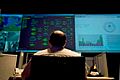
An engineer working inside a network operations control room.
-

Concept illustration of a solar-powered satellite data center in orbit.


See Also
 In Spanish: Centro de procesamiento de datos para niños