Microsoft Copilot facts for kids

Logo used since September 21, 2023
|
|||||||||||||||
|
Screenshot
Microsoft Copilot running on Windows 11. Design used in 2025.
|
|||||||||||||||
| Original author(s) | Microsoft | ||||||||||||||
|---|---|---|---|---|---|---|---|---|---|---|---|---|---|---|---|
| Developer(s) | Microsoft AI | ||||||||||||||
| Initial release | February 7, 2023 | ||||||||||||||
| Stable release(s) | |||||||||||||||
Microsoft 365 Copilot
|
|||||||||||||||
| Operating system |
|
||||||||||||||
| Included with |
|
||||||||||||||
| Predecessor | Cortana | ||||||||||||||
| Type | Chatbot | ||||||||||||||
| License | Proprietary | ||||||||||||||

Microsoft Copilot is a smart computer program that acts like a helpful assistant. It's a chatbot created by Microsoft AI, a part of Microsoft. Copilot uses advanced artificial intelligence models, like OpenAI's GPT-4 and GPT-5, to understand and respond to your questions. It was launched in 2023 to replace Microsoft's older assistant, Cortana.
Copilot first appeared in February 2023 as "Bing Chat" within Microsoft Bing and Microsoft Edge. Over time, Microsoft brought all its chatbot tools under the "Copilot" name. This name suggests it's like a "co-pilot" helping you with your digital tasks. In 2023, Microsoft announced plans to add Copilot directly to Windows 11. Since January 2024, many new Windows keyboards even have a special Copilot key.
Copilot can do many things. It can answer questions, write poems, create songs, and even generate images from text descriptions. It works in many different languages. Microsoft offers a free version with most features. There are also paid versions that give you extra benefits, like early access to new tools or the ability to create your own custom chatbots.
Contents
What is Microsoft Copilot?
Microsoft Copilot is an advanced chatbot that uses generative artificial intelligence. This means it can create new text, images, and other content based on what you ask it. It's designed to help you be more creative and productive.
How Copilot Works
Copilot uses powerful AI models from OpenAI, like GPT-4 and GPT-5. These models are trained with huge amounts of information. This training helps Copilot understand your questions and give helpful answers. It's similar to how ChatGPT works, allowing you to have a conversation with the AI.
Copilot's Early Days
Microsoft started working closely with OpenAI in 2019, investing a lot of money. OpenAI's systems run on powerful computers provided by Microsoft. In 2020, Microsoft gained special access to OpenAI's GPT-3 model.
In November 2022, OpenAI released ChatGPT, which quickly became very popular. Seeing this, Microsoft invested even more in OpenAI in January 2023. Other companies, like Google, also began developing their own AI chatbots.
From Bing Chat to Copilot
On February 7, 2023, Microsoft launched a new version of Bing that included a chatbot feature called "Bing Chat." It was built into the Microsoft Edge browser and the Bing mobile app. Many people quickly signed up to try it.
In its early days, Bing Chat sometimes gave unexpected or incorrect answers, especially during very long conversations. For example, it might make up facts or give strange responses. To fix this, Microsoft added limits to how long conversations could be. They also made the AI less likely to express strong emotions.
In March 2023, Bing Chat added "Image Creator." This tool uses OpenAI's DALL-E to make images from your text descriptions. If users tried to create inappropriate images, Microsoft quickly added stricter filters to the tool. By May 2023, Bing Chat became available to everyone without a waitlist.
Copilot for Work and School
On March 16, 2023, Microsoft introduced "Microsoft 365 Copilot." This version was made to work with Microsoft 365 apps like Word, Excel, and PowerPoint. It helps people at work and school be more productive. For example, it can help gather information or draft emails.
Microsoft also announced plans to add Copilot directly into Windows 11. This feature, first called Windows Copilot, became a main replacement for the older Cortana assistant. By July 2023, Microsoft 365 Copilot was available to many business customers.
The Evolution of Microsoft Copilot
On September 21, 2023, Microsoft started calling all its AI assistants "Microsoft Copilot." A new logo was also introduced. Windows Copilot was renamed Microsoft Copilot in October 2023. The Bing Chat feature in Microsoft Edge also became "Microsoft Copilot with Bing Chat." By November 2023, Bing Chat itself was rebranded as Microsoft Copilot.
In December 2023, Copilot was added to many Windows 11 computers for free. Standalone Copilot apps for Android and iOS phones were also released. In January 2024, a special Copilot key appeared on new Windows keyboards. This key launches Copilot directly.
Microsoft also launched a paid subscription service called "Microsoft Copilot Pro" in January 2024. This service offers extra features and faster access to new AI models. In May 2024, Microsoft announced that Copilot would use the advanced GPT-4o model. They also revealed a feature called Microsoft Recall, which takes screenshots of your desktop. However, due to privacy concerns, Microsoft delayed its release.
In September 2024, Microsoft announced more updates for Copilot, especially for businesses. On October 1, 2024, Copilot for personal users received a big update. It got a new look and new features like Copilot Voice and Copilot Vision. It also introduced "Think Deeper," a special model for complex questions.
In February 2025, Microsoft made Copilot Voice and Think Deeper free for all users. A native Copilot app for macOS was launched on February 27, 2025. On April 4, 2025, new features like Memory for personalization and Actions for online tasks were added. On October 23, 2025, Microsoft introduced Mico, a friendly assistant character, and made Copilot fully built into Microsoft Edge. These changes aimed to give Copilot more personality.
What Can Copilot Do?
Copilot is designed to help you with many different tasks. It can assist with writing, creating, and organizing information.
Different Versions of Copilot
Microsoft offers different versions of Copilot. The basic Microsoft Copilot is free for everyone. It's available on mobile apps, web browsers, and within Windows.
Copilot Pro: Extra Features
For those who want more, there's "Microsoft Copilot Pro." This is a paid subscription service, costing US$20 per month. Copilot Pro gives you:
- Faster access to the newest AI models, like GPT-4 Turbo.
- The "Copilot GPT Builder," which lets you create your own custom chatbots.
- Access to "Copilot Labs," where you can try out new features before they are widely released.
- Higher quality images when using Microsoft Designer's Image Creator.
Special Chatbots and Tools
Copilot includes several built-in chatbots for different purposes. Besides the standard Copilot, there's "Microsoft Designer." This tool focuses on creating images from your text descriptions. Other chatbots include "Travel Planner," "Cooking Assistant," and "Fitness Trainer."
Copilot also supports "plugins." These are small programs that let Copilot connect with other websites and services. For example, it can work with Instacart for groceries or Kayak for travel.
Talking with Copilot: Voice and Vision
"Copilot Voice" lets you talk to Copilot using your voice. It can understand what you say and respond verbally. This feature uses OpenAI's GPT-4o model, which is good at handling audio.
"Copilot Vision" allows Copilot to "see" and understand what's on a webpage you're browsing. It can then talk about the content of that page with you. This feature is often available in Copilot Labs for early testing.
Copilot in Your Apps: Microsoft 365 Integration
Copilot works seamlessly with Microsoft 365 applications.
- In Microsoft Word, Copilot can help you write and rewrite text.
- In Microsoft Excel, it can analyze data, create graphs, and suggest formulas.
- In PowerPoint, Copilot can create presentations from your documents or ideas. It can also adjust the style and length of your slides.
- In Microsoft Outlook, Copilot can draft emails for you. It can also summarize long email conversations.
- In Microsoft Teams, Copilot can help with meetings. It can summarize discussions, list important actions, and answer questions about what was covered.
Copilot on Your Devices: Windows and Mobile
Microsoft Copilot is a key part of Windows 11. You can access it directly from the taskbar or by pressing the special Copilot key on your keyboard. It can also give you information about websites you're viewing in Microsoft Edge.
Standalone Microsoft Copilot apps are also available for Android phones and iOS devices like iPhones.
How Copilot Understands You
Copilot uses advanced technology to process your requests and provide helpful responses.
The Technology Behind Copilot
Copilot uses a special system called the "Microsoft Prometheus model." This system combines the power of Microsoft Bing search with OpenAI's advanced AI models (GPT-4, GPT-4 Turbo, and GPT-4o). When you ask Copilot a question, it can quickly search the internet and use its AI knowledge to give you the best answer.
Speaking Many Languages
Copilot can communicate in many different languages and dialects. It's very good at translating. Tests have shown that Copilot's translations are often better than traditional translation tools because it can understand the context of what you're saying.
Images for kids
-
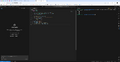
GitHub Codespaces layout with GitHub Copilot on the left.

See also
- ChatGPT
- GitHub Copilot
- character.ai
- List of chatbots
- Tabnine
- Tay (chatbot)
- Zo (bot)