
MacBook Neo facts for kids
.svg) |
|

MacBook Neo in Indigo finish
|
|
| Developer | Apple |
|---|---|
| Product family | MacBook |
| Type | Laptop |
| Operating system | Original: macOS Tahoe 26.3.2 Current: macOS Golden Gate 27.0, released September 14, 2026 |
| CPU | Apple A18 Pro |
| Memory | 8 GB |
| Storage | 256 or 512 GB SSD |
| Display | 13-inch, 2408 × 1506 Liquid Retina IPS (219 ppi, 500 nits) |
| Input | Magic keyboard, mechanical multi-touch touchpad |
| Camera | 1080p FaceTime HD |
| Connectivity |
|
| Power | 36.5 Wh lithium‑ion battery |
| Dimensions | 0.5 × 11.71 × 8.12 in (13 × 297 × 206 mm) |
| Mass | 2.7 lb (1.22 kg) |
| Predecessor | 12-inch MacBook |
| Related | |
The MacBook Neo is an affordable portable computer designed and built by Apple. It is part of the popular MacBook family of notebook computers. This computer made tech history as the very first Mac to run on an A-series microchip. These chips were originally built just for the iPhone and the iPad. Other computers made with Apple silicon rely instead on the M-series family of processors. Apple introduced the computer on March 4, 2026, and officially released it on March 11, 2026. It serves as an entry-level notebook sitting directly below the MacBook Air and the professional MacBook Pro. It is Apple's lowest-priced laptop computer.
Contents
History and Creation of the MacBook Neo
Early Rumors and Development
Rumors about an affordable, student-friendly notebook computer started to spread after Apple's annual WWDC 2025 developer conference. Tech reporters heard whispers that Apple was engineering a light 13-inch (330 mm) notebook. Many expected it to feature the fast A18 Pro processor found inside flagship mobile devices. By November 2025, industry insiders confirmed that Apple wanted a budget-friendly Mac computer to go on sale in 2026. Apple wanted to give families and schools a great choice when shopping against Windows machines and Chromebook devices.
By February 2026, technology news website MacRumors revealed accurate details about the computer's fun colors, cool features, and launch timeline. Just one day before the big public reveal, regulatory paperwork appeared on Apple's official website. This quick leak revealed the "MacBook Neo" name to the public a few hours before Apple's big event.
Launch and Affordable Pricing
Apple formally debuted the MacBook Neo on March 4, 2026, during a major spring hardware event. The company designed the notebook especially for everyday tasks, homework, and classroom learning. An Apple marketing executive explained that they chose the name "Neo" because it felt fun, friendly, and fresh.
When it first hit store shelves, the MacBook Neo cost $599 for regular shoppers. Students and teachers qualified for education pricing and could buy it for just $499. This made it the most affordable brand-new laptop Apple had ever produced. Customers could place advance orders on March 4, 2026, and deliveries began on March 11, 2026. Later that summer, on June 25, 2026, Apple raised the price by $100 due to global shortages of computer memory chips.
Clever Chip Recycling and Savings
To keep the price as low as possible, Apple used a clever manufacturing technique known as chip binning. When factories make silicon processors, tiny microscopic flaws can happen on the silicon wafer. During the production of the iPhone 16 Pro, Apple set aside A18 Pro chips where one of the six graphics processing cores had a tiny flaw. Instead of throwing these processors away, engineers turned off the single imperfect core. This created a completely functional five-core graphics processor ready for everyday work.
Because Apple had already paid to manufacture these chips for phones, using them in the new computer cost almost nothing extra. Apple used up an initial stockpile of five million binned chips. When the laptop became popular, Apple ordered factory runs for ten million more units. To keep prices low, the computer includes 8 gigabytes of memory and a simpler screen. It also skips fancy extras like a backlit keyboard and replaces the Force Touch trackpad with an everyday mechanical trackpad.
Design and Outer Features
Colorful Lightweight Enclosure
The outer shell of the MacBook Neo looks very similar to the sleek MacBook Air. It features a sturdy metal body made from lightweight aluminum. The screen has smooth, narrow black borders around the edges. Unlike other recent Apple laptops, it has a notchless screen, making the entire display shape clean and smooth.
Apple created the aluminum shell using a special manufacturing technique called extrusion. In this method, heated metal is pushed through a shaped opening like dough. This creates the general shape before precise machining finishes the edges. In contrast, expensive laptops use CNC milling machines to carve bodies out of giant solid metal blocks. Extrusion saves time, wastes less raw material, and keeps production costs low. The Neo comes in four bright colors: Silver, Blush pink, Citrus yellow, and Indigo blue. The typing keys, clickpad, plastic feet, and side ports are all color-matched to the metal shell.
Built-in Ports and Connectivity

The MacBook Neo keeps its connection options simple and easy to understand. On the left side, users get two USB-C shape ports. One is a high-speed USB 10Gbps port that can send video to monitors using DisplayPort 1.4. Next to it sits a slower USB 2.0 port for plugging in chargers or basic accessories. It also includes a classic 3.5 mm audio jack for wired headphones, along with fast Wi-Fi 6E and Bluetooth 6 wireless connections.
Hardware Performance and Screen
Sharp Screen and Video Camera
The laptop features a bright 13-inch Liquid Retina display panel. It has a sharp screen resolution of 2408 by 1506 pixels, giving it a pixel density of 219 pixels per inch. The screen reaches a brightness of 500 nits, which helps kids read text easily in sunny classrooms. It can show over one billion distinct colors.
To lower costs compared to higher-priced computers, the panel uses the standard sRGB color space instead of the wider Wide P3 palette. It also leaves out True Tone lighting adjustments. However, it includes a helpful anti-reflective coating that stops annoying glare from classroom ceiling lights. Above the screen sits a clear 1080p video camera for FaceTime video calls with friends and family.
System on a Chip Architecture
Inside the computer sits the powerful Apple A18 Pro, a tiny silicon marvel known as a system on a chip. This single piece of silicon combines the central processor, graphics unit, and memory controllers. It contains a six-core processor with two fast performance cores for heavy tasks and four efficiency cores for saving battery power. The chip also has a five-core graphics processor.
Because the chip originally powered pocket-sized smartphones, it uses very little electric power and creates almost no excess heat. This efficiency allows the MacBook Neo to run completely silent with a passive fanless cooling system. The computer has no spinning fans inside to suck in dust or make humming noises. The base 256-gigabyte storage model uses a standard physical power button, while the larger 512-gigabyte model adds a Touch ID fingerprint reader.
Everyday Speed and Professional Testing
Technology reviewers were impressed by how smoothly the laptop ran everyday apps. Hardware tests performed by Digital Trends using Geekbench gave the laptop single-core performance scores of 3,461 points and multi-core scores of 8,668 points. The graphics scored 31,286 points using Apple's Metal software engine. In some basic tests, the computer even beat the powerful M3 iPad Air.
Tyler Stalman, a professional camera expert and video producer, tested the entry-level computer during real photo and movie projects. He reported that editing high-definition 4K video clips on the MacBook Neo worked well, even when several other programs were open at the same time.
Repairability and School Friendly Design
Easy Repairs for Classrooms
When tech experts take gadgets apart to see how easy they are to fix, they usually find lots of glue. However, a teardown report from repair experts at iFixit praised the MacBook Neo as Apple's most repairable laptop in 14 years. Instead of gluing everything down, Apple used regular metal screws to hold the battery and keyboard in place.
The Neo avoids digital parts-pairing locks, which means replacement parts can swap in without special factory computer programs. The side connection ports and internal audio speakers are completely modular parts that technicians can unscrew and replace in minutes. Apple picked this friendly mechanical design because schools often buy thousands of laptops at once. When students accidentally break a charging port or spill water on a speaker, school computer technicians can repair the machine quickly and affordably.
Technical Specifications Table
| Model | MacBook Neo | |||
|---|---|---|---|---|
| Basic Information | Hardware identifier | Mac17,5 | ||
| Model identifier | A3404 | |||
| Operating system | macOS Tahoe 26.3.2 | |||
| Starting price (MSRP) | US$699 (256 GB) | US$799 (512 GB) | ||
| Available Colors | Silver, Blush, Citrus, and Indigo | |||
| Physical Dimensions | Thickness and footprint | 0.5 in (13 mm) thin; 11.71 in (297 mm) by 8.12 in (206 mm) | ||
| Weight | 2.7 lb (1.22 kg) | |||
| Biometrics | Touch ID | No | Yes | |
| Display | Display size and type | 13 in (330 mm) Liquid Retina IPS screen | ||
| Resolution and density | 2408 × 1506 pixels at 219 ppi | |||
| Brightness and color | 500 nits, sRGB color space | |||
| Processor and RAM | Chip | Apple A18 Pro built on 3-nanometer technology | ||
| Processor cores | 6-core CPU (2 performance and 4 efficiency cores) | |||
| Graphics and AI | 5-core GPU with ray tracing and 16-core Neural Engine | |||
| System memory | 8 GB LPDDR5X unified memory | |||
| Cooling design | Fanless passive heat spreader | |||
| Storage | Drive capacity | 256 GB SSD | 512 GB SSD | |
| Connections | Wired ports | 1 × USB 10Gbps (DisplayPort), 1 × USB 2.0, 3.5 mm jack | ||
| Wireless | Wi-Fi 6E and Bluetooth 6 | |||
| Audio and Camera | Camera | 1080p FaceTime HD camera | ||
| Speakers | Stereo speakers with Dolby Atmos audio playback | |||
| Battery | Capacity | 36.5 W·h lithium-ion battery | ||
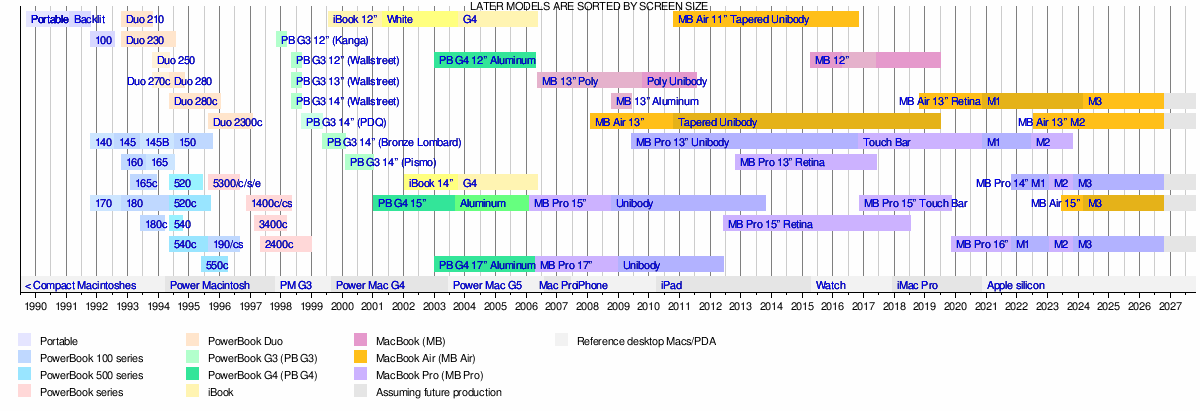
Timeline of Portable Macintoshes
| Timeline of portable Macintoshes |
|---|
 |