
MacBook facts for kids

A MacBook is a popular family of laptop computers made by the technology company Apple. These machines are part of the Mac family and run an operating system called macOS. Apple first introduced the MacBook line in 2006 to take over from their older PowerBook and iBook computers. Apple leader Steve Jobs had announced a big plan called the Mac transition to Intel processors in 2005. That change helped Apple build thinner, faster, and more modern notebook computers for work and school. Today, the family includes several styles of laptops like the super-portable MacBook Air, the high-speed MacBook Pro, and the student-friendly MacBook Neo.
Between 2006 and 2019, Apple also made two special computers named simply "MacBook." In 2015, experts named the MacBook family the top-selling line of premium portable computers on the planet. People around the world use these computers every day for school projects, video games, making music, and browsing the internet.
Contents
How Apple Designed the MacBook Computers
When the first MacBooks arrived in stores, they looked very similar to the older plastic iBooks and metal PowerBooks. Over time, Apple began building laptops using a single block of sturdy metal. This building method is called a unibody aluminum design. A unibody frame makes the laptop tough, light to carry, and sleek. It was first seen on the super-thin MacBook Air.
Inside that smooth body sits a keyboard made of durable black plastic keys. The MacBook Neo offers fun key colors that match the exterior case. Early MacBooks had little mechanical hooks or latches to hold the computer closed. Modern MacBooks instead use hidden magnets inside the frame. When you push the screen down, the magnets pull it shut with a quiet click.
MacBooks have changed a lot on the inside too. On older MacBooks from years ago, owners could open the bottom case with small tools. They could easily replace the computer's storage drive, plug in more memory, or swap an old battery. Today, Apple glues and solders these parts directly onto the main circuit board. This makes the laptops thinner and lighter, but it means you cannot upgrade the parts inside yourself. In addition, the MacBook Air and MacBook Pro feature illuminated keyboards for typing in the dark. The MacBook Neo skips this feature to keep costs lower.
Discover the Classic Standalone MacBook Models
Before sorting MacBooks into Air and Pro lines, Apple built two different computers that were simply called the "MacBook." These models became famous for their smart shapes and new ideas.
White Plastic and Metal: MacBook from 2006 to 2012
Apple introduced the original 13-inch MacBook in May 2006. It took over the role of the older PowerPC-powered iBook series. Apple wanted to give students, families, and everyday shoppers a reliable Mac that did not cost too much money. It cost less than the high-end MacBook Pro workstation, which was made for heavy creative tasks. Later on, Apple introduced the featherweight MacBook Air.
The basic MacBook was an enormous hit with families and schools. It quickly became the best-selling Mac computer in Apple's entire history. For five whole months during 2008, it stood as the top-selling laptop across all computer brands in American stores.
Over six years, Apple built three distinct versions of this computer:
- The first version used a tough outer shell crafted from polycarbonate plastic and strong fiberglass. It took many styling cues from the older iBook G4.
- The second version arrived in late 2008. It dropped the white plastic for an aluminium unibody casing, just like the 15-inch MacBook Pro, but left out the FireWire port.
- The third design appeared in late 2009. It returned to a smooth white polycarbonate unibody shell that was very popular in schools.
Apple stopped selling this model to everyday buyers in July 2011, replacing it with the MacBook Air. Educational classrooms could still buy them until February 2012. The aluminum style lived on as the 13-inch MacBook Pro.
Super Slim Innovation: The 12-inch MacBook
In 2015, Apple surprised computer fans with an ultra-thin laptop known as the 12-inch MacBook. It squeezed right between the MacBook Air and the MacBook Pro. This machine was smaller and lighter than any other Apple notebook made up to that point. It came with a super-sharp screen called a Retina display, showing text and pictures with amazing clarity.
Engineers designed this computer without any internal cooling fans. Because it was a fanless laptop, it ran in total silence even when working hard. It also used a special keyboard with flat "butterfly" keys. The tiny laptop had only two openings: a 3.5 mm headphone jack and one single USB-C port. That lone port handled everything from battery charging to moving files.
The 12-inch MacBook measured only 0.14 to 0.52 inches thick because of its wedged shape. Apple updated its speed in 2016 and 2017. Apple finally retired the model in July 2019 when the MacBook Air received its own Retina display.
The Modern MacBook Family Lineup
Apple divides its laptops into different categories so everyone can find the right computer for school, fun, or serious work.
MacBook Neo: Built for Learning and Everyday Tasks
The MacBook Neo serves as an affordable entry point for everyday users. Apple designed this computer mainly for school students and budget-minded families who need a great machine for homework. Instead of using a standard computer processor, it runs on an A18 Pro chip, which was originally created for smartphones.
Apple launched the first MacBook Neo in March 2026. The starter model included 256 gigabytes of storage for $599, with a student discount lowering the price to $499. Another version offered 512 gigabytes of storage and a Touch ID fingerprint scanner for $699. It features bright body colors, a 1080p video camera, two USB-C connectors, and clear dual speakers. In June 2026, a global memory shortage caused Apple to increase the price across all Neo models by $100.
MacBook Air: The Lightweight Laptop for Everyone
The MacBook Air is Apple's most popular laptop, famous for its thin and lightweight body. When it first launched, it was an expensive luxury computer. Over the years, Apple lowered the price, making the Air the perfect choice for high school and college students.
From 2010 to 2017, the classic MacBook Air came with a 13-inch screen, rectangular USB ports, a Thunderbolt port, and an SDXC camera card slot. Apple even sold a cute 11-inch version until late 2016. In late 2018, Apple redesigned the MacBook Air completely. They added a high-resolution Retina display, an Intel Y-series Amber Lake processor, modern USB-C ports, and a handy Touch ID button.
A major technology revolution arrived in November 2020. Apple introduced custom computer chips called Apple silicon, starting with the remarkable Apple M1 chip. The M1 MacBook Air ran entirely without a cooling fan. It handled complex homework, video editing, and games quietly while offering fantastic battery life.
In June 2022 at WWDC 2022, Apple introduced a fresh MacBook Air using the speedier Apple M2 chip. This edition added a flat look, new MagSafe magnetic charging, and a bright Liquid Retina screen with a camera notch. In June 2023 at WWDC 2023, Apple showed off a larger 15-inch model. Starting in 2024, Apple began updating both sizes regularly with newer M series processors, including the powerful Apple M5.
MacBook Pro: Maximum Power for Creative Pros
The MacBook Pro is Apple's most capable laptop, built for digital artists, movie makers, coders, and scientists. It comes in large sizes, including 14-inch and 16-inch screens, to give users maximum workspace.
For several years, MacBook Pro laptops included an interactive glass touch strip above the keys called the Touch Bar, instead of standard function keys. In late 2019, Apple brought out a 16-inch model that replaced older AMD Polaris and Vega graphics with speedy Navi processors. It also carried a giant 100-watt-hour battery, the largest size allowed on passenger planes by the Transportation Security Administration.
In late 2020, Apple placed the Apple M1 chip into the 13-inch MacBook Pro. Unlike the fanless Air, the Pro kept an internal fan so the processor could run at top speed for hours without slowing down.
A massive redesign arrived in October 2021. Apple listened closely to professional users and brought back useful features that had gone missing. They returned physical function keys, a full-sized HDMI port for television screens, an SDXC camera slot, and MagSafe charging. These machines used powerful ARM-based chips designed by Apple called the M1 Pro and M1 Max. They also introduced stunning screens with smooth ProMotion technology, a clear 1080p webcam, fast Wi-Fi 6, three Thunderbolt 4 ports, and immersive Dolby Atmos sound. The large 16-inch edition shipped with a special 140-watt GaN power adapter supporting fast USB-C Power Delivery 3.1.
Apple continued making the Pro line even faster over the following years:
- In January 2023, Apple added M2 Pro and M2 Max chips, along with Bluetooth 5.3 and super-fast Wi-Fi 6E.
- In October 2023, new models arrived with next-generation M3 processors.
- In October 2024, Apple upgraded the lineup with M4 chips for improved performance.
- In October 2025, Apple launched updated 14-inch models using the fast Apple M5 processor.
- In March 2026, Apple introduced new 14-inch and 16-inch models packing mighty M5 Pro and M5 Max chips. These advanced laptops included the Apple N1 wireless chip, bringing blazing-fast Wi-Fi 7 and modern Bluetooth 6 connections to users everywhere.
Comparing Modern MacBook Models
The table below shows how different modern MacBook models compare in processing power, screen quality, and features.
| Processor (Apple silicon) |
Memory | Storage | Graphics | Display resolution (IPS Retina) |
Peripheral connections | List price (in US$) |
|
|---|---|---|---|---|---|---|---|
| 6-core Apple A18 Pro system-on-chip with 2 performance cores and 4 efficiency cores | 8 GB of unified in-package memory with 60 GB/s of memory bandwidth | 256 GB or 512 GB PCIe-based SSD | 5-core Apple-designed integrated GPU with shared memory | 13", 2408 × 1506, 219 ppi with sRGB color, 500 cd/m2, 1 billion colors | 36.5 Wh | $699, $599 for students | |
| 10-core Apple M5 system-on-chip with 4 super cores and 6 efficiency cores | 16 GB or 24 GB of unified in-package memory with 153 GB/s of memory bandwidth
Optional 32 GB at the time of purchase only. |
512 GB or 1 TB PCIe-based SSD
Optional 2 TB or 4 TB at the time of purchase, not upgradable after. |
8-core or 10-core Apple-designed integrated GPU with shared memory | 13.6", 2560 × 1664, 224 ppi with wide color (P3), 500 cd/m2, True Tone display, 1 billion colors |
|
53.8 Wh | $1,299, $1,199 for students |
| 10-core Apple-designed integrated GPU with shared memory | 15.3", 2880 × 1864, 224 ppi with wide color (P3), 500 cd/m2, True Tone display, 1 billion colors | 66.5 Wh | $1,499, $1,399 for students | ||||
| 16 GB, 24 GB or 32 GB of unified in-package memory with 153 GB/s of memory bandwidth | 1 TB PCIe-based SSD
Optional 2 TB or 4 TB at the time of purchase, not upgradable after. |
14.2", 3024 × 1964, 254 ppi with wide color (P3), SDR brightness: up to 1000 cd/m2 (outdoor), XDR brightness: 1000 cd/m2 sustained full-screen, 1600 cd/m2 peak (HDR content only), True Tone display, 1 billion colors, 1,000,000:1 contrast ratio, 120 Hz adaptive refresh rate with ProMotion technology | 72.4 Wh | $1,999, $1,899 for students | |||
|
Optional 48 GB or 64 GB, 128 GB (M5 Max with 40-core GPU) RAM configuration available at time of purchase only |
1 TB or 2 TB PCIe-based SSD
Optional 4 TB, 8 TB (M5 Max) at the time of purchase, not upgradable after. |
Optional 40-core GPU (M5 Max with at least 48 GB memory) available at time of purchase only. |
$2,499, $2,349 for students | |||
|
Optional 64 GB, 128 GB (M5 Max with 40-core GPU) RAM configuration available at time of purchase only |
|
16.2", 3456 × 2234, 254 ppi with wide color (P3), SDR brightness: up to 1000 cd/m2 (outdoor), XDR brightness: 1000 cd/m2 sustained full-screen, 1600 cd/m2 peak (HDR content only), True Tone display, 1 billion colors, 1,000,000:1 contrast ratio, 120 Hz adaptive refresh rate with ProMotion technology | 99.6 Wh | $2,999, $2,799 for students |
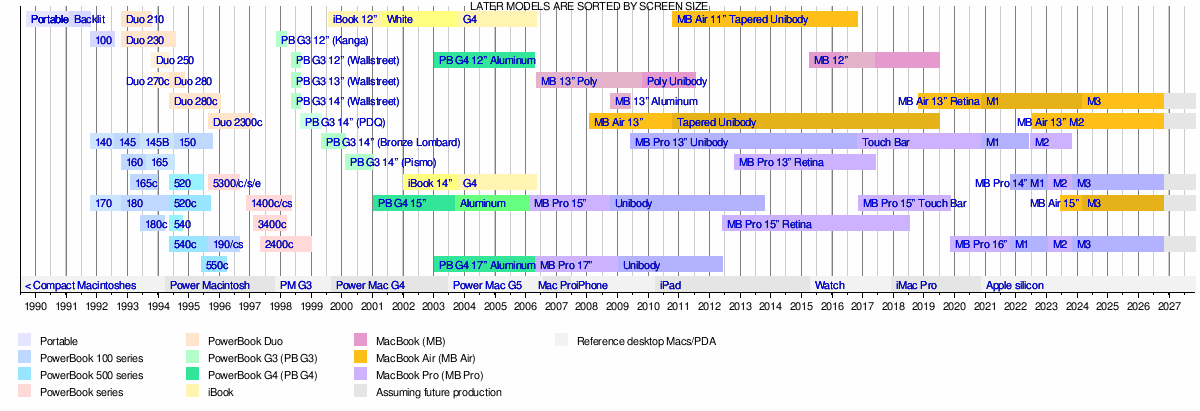
Timeline
| Timeline of portable Macintoshes |
|---|
 |
See also