
Mac (computer) facts for kids
 |
|
|
Various current models of Mac computers.
Top row, left to right: The MacBook Neo, MacBook Air, and MacBook Pro laptops Bottom row, left to right: The iMac, Mac Mini, and Mac Studio desktops |
|
| Also known as | Macintosh |
|---|---|
| Developer | Apple Inc. |
| Manufacturer | Apple Inc. |
| Type | Desktop computers, all-in-one computers, laptop computers (current) |
| Released | January 24, 1984 |
| Lifespan | 1984–present |
| macOS "Classic" Mac OS (formerly) |
|
| Related | Apple II Apple Lisa iPad |

.jpg)
_front.jpg)
The Mac is a famous family of personal computers created by Apple. People first knew it as the Macintosh. Apple picked this name after a tasty fruit called the McIntosh apple. The original Mac came out way back in January 1984. It changed computing by showing that home computers could be fun and friendly. Today, millions of students, artists, and families use Macs every day.
Modern Mac computers come in several different shapes and sizes. If you want a laptop computer to carry to school, Apple makes portable models. These include the light MacBook Neo, the slim MacBook Air, and the powerful MacBook Pro. If you want a desktop computer that sits on a desk, Apple builds several great options. You can pick the colorful iMac, which is an all-in-one computer that houses the computer inside the screen. You can also choose the compact Mac Mini or the super-fast Mac Studio.
Every Mac runs special software called an operating system. Apple equips each machine with macOS. This system is kept private by Apple and comes bundled with every Mac. It is built on a sturdy foundation called Unix. Before this modern software existed, older computers used the Classic Mac OS. Today, Macs use custom brain chips known as Apple silicon, making them run fast and stay cool.
Contents
- The Amazing History of Apple Macintosh Computers
- How the Macintosh Computer Was Invented (1979–1984)
- Launch and Early Creative Success (1984–1991)
- Growing Pains and the Big Processor Switch (1991–1998)
- The Colorful iMac and Returning to Profit (1998–2005)
- The Intel Processor Era and Ultra-Thin Laptops (2005–2011)
- New Innovations and Design Experiments (2011–2018)
- The Modern Era of Apple Silicon Power (2018–Present)
- Current Mac Models in Production
- How Apple Shares the Mac with the World
- Inside Mac Hardware and Helpful Accessories
- Friendly Software and Creative Mac Apps
- Images for kids
- Timeline
- See also
The Amazing History of Apple Macintosh Computers

Before the Mac existed, computers looked like boring boxes. Users had to memorize tricky text commands to do basic tasks. Apple wanted to create a machine that anyone could use without reading a giant manual. The journey to build this machine took many years of hard work, creative inventions, and exciting ideas.
How the Macintosh Computer Was Invented (1979–1984)
During the late 1970s, Apple found huge success with a machine called the Apple II. Schools and families loved it. Soon, a rival company named IBM launched the IBM PC in 1981. The IBM computer quickly became very popular in business offices. Apple knew it needed something fresh and easy to keep up.
Apple first built an advanced computer called the Apple Lisa in 1983. The Lisa featured a brilliant graphical user interface. Instead of typing lines of words, people saw pictures on screen. Apple engineers borrowed inspiration from visits to see the Xerox Star computer. The Lisa team improved these concepts with direct manipulation. Users could drag and drop items, double-click icons, and adjust windows by pulling edges. But the Lisa cost nearly ten thousand dollars! Because it was so expensive, very few people bought it.
Meanwhile, a small skunkworks team worked on a secret project called Macintosh. An Apple computer scientist named Jef Raskin started this project in 1979. He wanted to make an affordable home computer for everyone. Raskin loved eating the crisp McIntosh apple, so he named the project after it. His small team included clever circuit designer Burrell Smith and Apple co-founder Steve Wozniak.
In 1981, Apple co-founder Steve Jobs took charge of the Macintosh group. This happened while Wozniak took time away after an airplane crash. Jobs loved the Lisa's friendly screen and its handheld mouse. He guided the team to give the Mac those same great features. Best of all, Jobs wanted it sold at a fraction of the Lisa's giant cost.
Launch and Early Creative Success (1984–1991)

Apple officially introduced the original Macintosh in January 1984. It had an integrated screen, a keyboard, and a little mouse. At first, shoppers were amazed by the easy controls. However, early sales soon slowed down. The computer had a small amount of memory and ran slowly. It used only one floppy disk slot, which meant users had to swap disks over and over.
Even with these early bumps, creative thinkers loved the Mac. Famous writer Douglas Adams wrote about how much he loved the machine's creative spirit. Talented programmers wrote brand-new software for it. Early hits included MORE, Excel, and a layout tool named PageMaker. Apple soon listened to feedback and released the faster Macintosh 512K.
The Macintosh changed how words appeared on screens. Steve Jobs loved typography, the art of designing letters. Because of this, the Mac let people pick fonts, bold lettering, slanted italics, and outlines. When paired with the crisp LaserWriter printer, the Mac launched the desktop publishing revolution. Users could design books and magazines right from their desks using a true WYSIWYG screen.
Journalist Steven Levy noticed that office workers secretly brought Macs to work because they were so fun. A large accounting business called KPMG bought thousands of Macs for its traveling workers. In 1985, programmer Bill Atkinson designed a creative program called HyperCard. Inspired by the Dynabook and ideas like the memex, it allowed users to link cards together with text and pictures.
During the late 1980s, an executive named Jean-Louis Gassée took charge of the Mac division. He wanted to make machines for tech enthusiasts and power users. Apple released the Macintosh II in 1987, introducing dazzling color graphics. In 1989, Apple also made its first battery-powered laptop, called the Macintosh Portable. But this early mobile computer was heavy and expensive. Gassée soon left Apple.
Apple leader John Sculley long preferred selling computers for high prices. However, inexpensive MS-DOS computers and clone machines were gaining huge ground. To compete with budget-friendly IBM PC compatibles, Apple changed tactics. In 1990, Apple released the colorful Macintosh LC and the budget-friendly Macintosh Classic. These lower-priced models were big hits with schools and families.
Growing Pains and the Big Processor Switch (1991–1998)

In 1991, Apple launched a sleek new laptop named the PowerBook 100. Unlike bulky rivals, it gave typists comfy palm rests and a built-in trackball. The PowerBook became a massive success and quickly earned over one billion dollars.
To make even faster computers, Apple joined forces with IBM and Motorola. This partnership was known as the AIM alliance. Together, they engineered a powerful new computer processor named PowerPC. They also tried building software called Taligent. In 1994, Apple launched the Power Macintosh, bringing the transition away from Motorola 68000 series chips.
Sadly, Apple ran into deep trouble during the mid-1990s. The company launched confusing computer lines like the Macintosh Performa. Store shelves were crowded with dozens of models that looked the same. Apple also suffered from painful quality control hiccups. For example, some PowerBook 5300 laptops had battery defects. New Apple leader Michael Spindler even looked for buyers to save Apple, talking with Sun and Philips.
Apple also allowed outside companies to sell official Macintosh clone computers running System 7. But this backfired by hurting Apple's own computer sales. At the same time, Microsoft launched Windows 95, which became an enormous worldwide hit. Businesses began switching from Macs to Windows NT systems. Apple's share of the computer market fell from nearly ten percent down to barely three percent.
Apple desperately needed modern software to replace its aging operating system. Secret software experiments named Star Trek and Copland were cancelled. New boss Gil Amelio searched outside Apple for help. He looked at systems like BeOS before choosing NeXTSTEP, made by a company called NeXT. Apple bought NeXT in early 1997, which brought Steve Jobs back home to Apple!
Jobs immediately went to work saving the company. At a famous Macworld gathering, Jobs showed off future software called Rhapsody. Jobs soon took over leadership of Apple. He made an important peace agreement with Microsoft leader Bill Gates. Microsoft promised to build Office for Mac, and Apple included Internet Explorer on Mac computers. Jobs also cancelled clone licenses and worked with stores like CompUSA to showcase Macs. Operations expert Tim Cook arrived to streamline manufacturing using modern ERP setups and just-in-time deliveries.
The Colorful iMac and Returning to Profit (1998–2005)

Steve Jobs knew Apple needed an exciting new computer to win people back. In August 1998, Apple launched the playful iMac G3. Created with talented designer Jony Ive, the iMac had a curvy shape made of see-through plastic colored in Bondi blue. Ive even put an easy-grip handle on the top so it looked friendly.
The iMac was built to connect to the fast-growing Internet. Jobs made bold choices to modernize it. Instead of traditional ADB plugs and clunky SCSI cables, the iMac used brand-new USB jacks. Jobs removed the outdated floppy disk slot and added a modern CD drive. The iMac became an enormous hit, selling hundreds of thousands of units within months. Many buyers were first-time computer owners.
Apple used this creative momentum to launch other fun products. In 1999, Apple released a tough portable computer for students called the iBook. It looked like a colorful clamshell and became the first laptop with built-in Wi-Fi. Apple also introduced a pro desktop called the Power Mac G3, nicknamed "Blue and White". Later in 2001, Apple unveiled the sleek Dual USB "Ice" iBook and the ultra-thin Titanium PowerBook G4. Apple also tested bold ideas like the compact Power Mac G4 Cube, which taught engineers valuable lessons about machining metal cases.
Behind the scenes, engineers finished a brand-new foundation for Apple software. Built with a Mach core and BSD Unix code, Apple opened its core engine as Darwin. Programmers used handy tools named Carbon and Cocoa to prepare their software. Apple also created the Classic environment so older programs still worked. In March 2001, Apple launched Mac OS X 10.0 Cheetah, featuring the shiny Aqua interface with safe memory protection and smooth preemptive multitasking.
Apple soon turned the Mac into a creative command center. Users plugged video cameras into FireWire ports to edit home movies in iMovie. People used iTunes to organize songs, iPhoto to fix pictures, and GarageBand to record musical instruments. This software hub paved the way for smash hits like the pocket-sized iPod, the iPhone, and the iPad.
Apple continued making exciting hardware. In 2002, the company launched the "Sunflower" iMac G4 with an adjustable screen that floated on a metal arm. In 2003, Apple launched aluminum laptops like the PowerBook G4 and its own fast web browser called Safari. In 2005, Apple introduced the tiny, affordable Mac Mini desktop, manufactured with partner Foxconn, alongside office software named iWork.
The Intel Processor Era and Ultra-Thin Laptops (2005–2011)

By 2005, PowerPC processors struggled to keep up with mobile performance needs. Steve Jobs surprised the world by announcing the Mac transition to Intel processors. To help users during the shift, a smart helper tool called Rosetta ran old programs automatically. Apple also offered Boot Camp, which let users run Windows on their Mac hardware if needed.
After launching the iPhone, Apple brought popular mobile features back to its computers. In 2008, Jobs showed off the very first MacBook Air by sliding it out of an office envelope. It was so thin that it left out old optical disc drives and big ports, inspiring modern ultrabook designs.
Apple also updated Mac laptops with multi-touch trackpads that let people pinch and swipe. Desktops received clever accessories like the Magic Mouse and Magic Trackpad. Apple also removed harsh materials like mercury and PVC plastic from its machines to protect nature.
In early 2011, Apple added speedy Thunderbolt connection ports to the MacBook Pro. That same year, OS X Lion added the Mac App Store so users could download games and apps just like on an iPad.
New Innovations and Design Experiments (2011–2018)

In August 2011, Steve Jobs stepped down as Apple leader, and Tim Cook became the new chief executive. Cook quickly introduced iCloud to keep files synced across all Apple devices. In 2012, Apple gave the MacBook Pro a razor-sharp Retina display and took the disc drive out of the slim iMac.
Apple engineers loved testing daring designs. In 2013, Apple launched a sleek, black 2013 Mac Pro shaped like a cylinder. While reviewers praised its small size, professional video makers wanted more room inside to plug in extra parts. In 2014, the Retina iMac arrived with a stunning 5K resolution screen.
In 2016, Apple launched a thinner Touch Bar MacBook Pro. It replaced standard top keys with an interactive glass screen strip called the Touch Bar. It also used tiny USB-C plugs and a very flat Butterfly keyboard. However, some typists found that tiny dust specks made the keys stick. Apple listened closely to customer feedback and later replaced this mechanism with the durable Magic Keyboard.
The Modern Era of Apple Silicon Power (2018–Present)

For years, Apple designed ultra-fast chips for mobile phones. In 2020, Apple announced it would build its own computer brains in the Mac transition to Apple silicon. The company introduced the Apple M1 chip, combining computer cores, memory, and graphics into one tiny piece of silicon.
These new chips made Macs run amazingly fast while using very little battery power. Apple launched M1 versions of the MacBook Air, Mac Mini, and MacBook Pro. Soon after, Apple launched a colorful 24-inch iMac made with recycled aluminum.
In late 2021, Apple released redesigned 14-inch and 16-inch MacBook Pros. These laptops brought back helpful ports like HDMI, an SD card reader, and safe MagSafe charging cords. In 2022, Apple launched the Mac Studio desktop, packing huge computing power into a small metal box.
Apple continued upgrading its chips with the fast Apple M2, Apple M3, Apple M4, and Apple M5 processor lines. In 2026, Apple introduced the MacBook Neo, a colorful and affordable laptop designed for students. Apple also updated the Mac Mini with cutting-edge Apple M6 technology. Today, all new Mac computers run on Apple's own energy-saving silicon.
Current Mac Models in Production
Apple makes computers for school, home, and professional studios. Here is the lineup of Mac models currently being made:
| Model Name | Processor Brain | Computer Type | Best For |
|---|---|---|---|
| iMac (24-inch) | Apple M4 | All-in-one desktop | Families, bedrooms, and school classrooms |
| MacBook Neo | Apple A18 Pro | Ultraportable laptop | Students, beginners, and everyday homework |
| MacBook Air (13-inch and 15-inch) | Apple M5 | Ultraportable laptop | Travel, high school, and daily projects |
| MacBook Pro (14-inch and 16-inch) | Apple M5, M5 Pro, or M5 Max | Workstation laptop | Making video games, editing movies, and code |
| Mac Mini | Apple M6 or M5 Pro | Small form factor desktop | Flexible home desks and coding setups |
| Mac Studio | Apple M5 Max or M5 Ultra | Workstation desktop | Professional recording studios and animation |

Apple has always used clever storytelling to share its computers. When the first Mac arrived, Apple aired the famous "1984" commercial during Super Bowl XVIII. Directed by filmmaker Ridley Scott, it drew inspiration from George Orwell's book Nineteen Eighty-Four. The ad showed a brave runner smashing a giant grey screen to show how the Mac freed people's minds.
Later on, Apple launched the famous Think different campaign. Posters showed pictures of inspiring heroes like Albert Einstein, Gandhi, and Martin Luther King Jr.. The message told students and dreamers that creative people could change the world. In the 2000s, funny Get a Mac commercials showed two actors acting as a relaxed Mac and a clumsy office PC.
Mac computers also pop up in popular movies and television shows. Characters in films like Mission: Impossible and Legally Blonde use Macs to write stories and solve mysteries. Today, Macs remain popular in schools, design studios, and homes worldwide.
Inside Mac Hardware and Helpful Accessories

Apple designs both the outside shell and the inside parts of its computers. The company works with manufacturing partners like Foxconn and Pegatron to assemble machines. Most Macs are built in advanced facilities across Asia, with some models also made in the United States.
Fast Apple Silicon Processors
Every modern Mac uses ARM-based Apple silicon chips. In these chips, the processor cores, integrated graphics, and memory share one roof. This allows Mac laptops to open games instantly while keeping batteries running all day long.
Because these chips are so smart, they can run different kinds of apps. Through Rosetta 2, Macs run older Intel programs without any trouble. Macs can even run fun games and apps made for the iPadOS and iOS platforms.
Ports, Displays, and Accessories
Macs use modern ports to connect to fun gear. Many models include USB4 and super-fast Thunderbolt connections. These let users connect camera storage, musical keyboards, and giant screens in seconds. Laptops use snap-on MagSafe cables that pull away safely if someone trips on the wire.
Apple also builds great accessories for desk setups. Users can pick the colorful Studio Display or the pro-level Pro Display XDR. To type and click comfortably, Apple makes the wireless Magic Keyboard, the smooth Magic Mouse, and the glass Magic Trackpad. Apple's wireless AirPods headphones connect instantly to Macs for listening to music or class lessons.
Friendly Software and Creative Mac Apps

A computer needs great software to come alive. Macs run an operating system called macOS. It provides the pretty desktop screen, folders, and settings that you see when you turn the machine on.
The History of Mac Software
The original Macintosh ran software simply called "System". Over time, it became known as the Classic Mac OS, ending with Mac OS 9 in 1999. In 2001, Apple completely rebuilt the software to create Mac OS X.
Each version of macOS brought neat new tricks to explore:
- Mac OS X 10.4 Tiger introduced Spotlight to search for any document in a flash.
- Mac OS X 10.6 Snow Leopard made software run smoothly with full 64-bit support.
- OS X Lion added helpful swipe gestures inspired by the iPad.
- OS X Yosemite brought a bright, clean look using flat colorful windows.
- macOS Sierra welcomed Apple's friendly voice helper, Siri.
- macOS Mojave introduced Dark Mode to give tired eyes a rest at night.
- macOS Monterey added the Shortcuts app to automate everyday tasks.
- Modern systems like macOS 27 Golden Gate are designed to get the most speed out of Apple silicon chips.
Working Together with Other Apple Devices
Macs talk smoothly with other Apple gadgets using features called Continuity. If you start writing a note on an iPhone, you can finish it on your Mac using Handoff. If you need a second screen for your homework, Sidecar turns your iPad into an extra monitor. You can even use one keyboard and mouse across multiple devices using Universal Control.
Popular Apps for School and Fun
You can use almost any program on a Mac. For school papers and research, you can download Google Chrome or use Microsoft Office. If you enjoy making art, tools like Adobe Creative Cloud and GIMP let you draw and paint. If you love music, you can record songs with GarageBand or professional tools like Ableton Live.
Programmers use tools like Visual Studio Code and Apple's own Xcode to build games and apps. Many free community tools like LibreOffice and VLC work great too. Whether you want to write a story, create 3D animations in Cinema 4D, or chat with family, the Mac is built to help you learn and create!
Images for kids
-

The 2013 Mac Pro featured a tiny cylindrical aluminum body.
-
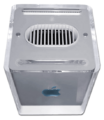
The Power Mac G4 Cube packed a full computer into a tiny clear cube.
-
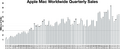
A chart showing quarterly Mac computer sales over many years.
-
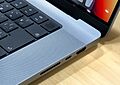
Modern MacBook Pro laptops include built-in SD card slots and fingerprint readers.
.jpg)


.jpg)
Timeline
| Timeline of Mac model families |
|---|
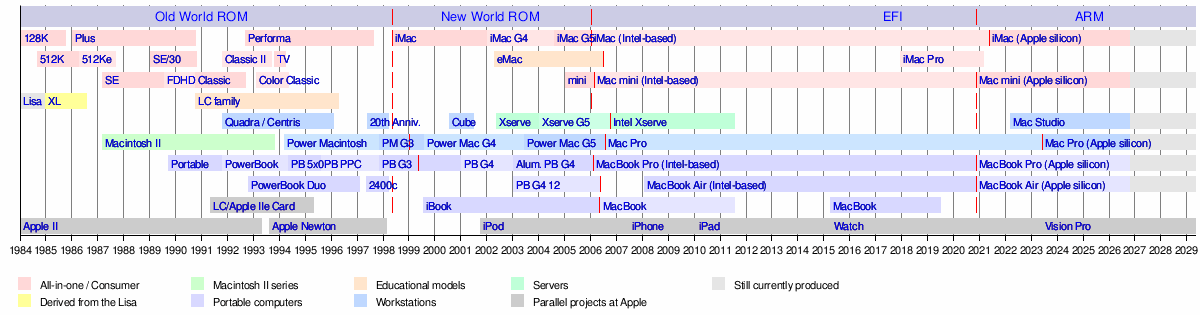 |
Source: Glen Sanford, Apple History, apple-history.com
See also
 In Spanish: Macintosh para niños