

- This page was last modified on 14 January 2026, at 12:03. Suggest an edit.
iPad Pro facts for kids
 |
|

|
|
| Developer | Apple |
|---|---|
| Product family | iPad |
| Type | Tablet computer |
| Release date | November 11, 2015 |
| Operating system | iOS (2015–2019) iPadOS (since 2019) |
| Power | Built-in rechargeable lithium-ion battery |
| System-on-chip used | Apple silicon chipsets |
| Storage | 32, 64, 128, 256 or 512 GB, 1 or 2 TB flash memory |
| Display | 12.9-inch: 2732×2048 px (264 PPI) (IPS panel) (5.5 megapixels), 12.9 in (327.8 mm) diagonal, 4:3 9.7-inch: 2388×1668 px (264 PPI) (IPS panel), 11 in diagonal, 3:2 |
| Sound | Four speakers, adjusting sound to device orientation |
| Input | Multi-touch screen, headset controls and ambient light sensors, 3-axis accelerometer, 3-axis gyroscope, digital compass, five microphones, Bosch Sensortec BMP280 barometer |
| Camera |
List
12.9-inch 1G: 1.2 megapixels 720p front-facing and 8 megapixels rear-facing
9.7-inch: 5 megapixels 720p front-facing and 12 megapixels 4K rear-facing |
| Connectivity |
List
Wi-Fi and Wi-Fi + Cellular:
Wi-Fi 802.11 a/b/g/n/ac; dual channel (2.4 GHz and 5 GHz); HT80 with MIMO Bluetooth 4.2 Wi-Fi + Cellular: GPS & GLONASS
12.9-inch Wi-Fi + Cellular:
9.7-inch Wi-Fi + Cellular:
|
| Online services | App Store, Apple Music, iTunes Store, iBookstore, iCloud, Game Center |
| Related articles | Apple Pencil |
The iPad Pro is a special kind of tablet computer made by Apple. It's like a super-powered iPad! These devices are known for being very fast and having amazing screens. They run on a special operating system called iPadOS, which is made just for iPads.
What makes the iPad Pro stand out? It can use the Apple Pencil, a special pen for drawing and writing. It also has a big, beautiful screen. Over time, other iPads have gotten some of these cool features. But the newest iPad Pro, the 8th generation, is extra special. It has a super powerful M5 chip inside, making it incredibly fast. It's also the thinnest Apple product ever made!
Contents
The Story of iPad Pro Models
The first iPad Pro came out in November 2015. It was bigger than other iPads and could use the Apple Pencil. It had a powerful A9X chip and came in two sizes: 9.7-inch and 12.9-inch. It ran iOS 9.
In June 2017, the second iPad Pro arrived. It had an even faster A10X Fusion chip. The 9.7-inch model was replaced with a slightly larger 10.5-inch screen. These were the last iPad Pros with a home button.
The third iPad Pro, released in November 2018, looked very different. It had an all-screen design, meaning the home button was gone! Instead, you could unlock it with Face ID, which uses your face. It came in 11-inch and 12.9-inch sizes. These were also the first iPads to use a USB-C connector.
In March 2020, the fourth iPad Pro was introduced. It kept the same screen sizes as the previous model. It had an updated camera and a powerful A12Z chip. A cool new feature was the LiDAR Scanner. This scanner helps the iPad understand depth, which is great for AR apps. It also worked with the new Magic Keyboard.
In May 2021, the fifth iPad Pro arrived with a huge upgrade: the Apple M1 chip. This is the same powerful chip found in some Apple computers! It made the iPad Pro incredibly fast. It also added super-fast 5G internet for staying connected on the go. The 12.9-inch model got a stunning new "Liquid Retina XDR" display, which made colors look amazing.
The sixth iPad Pro was announced in October 2022. It kept the same design but got an even faster M2 chip. A neat new feature was "Apple Pencil Hover." This allowed the iPad screen to sense the Apple Pencil even before it touched the display. It also added the ability to record high-quality ProRes videos.
In May 2024, the seventh iPad Pro was released. It had a brand new, super thin design. It came with the powerful M4 chip. This model was the first iPad to feature an amazing Tandem OLED display, called the "Ultra Retina XDR" display. This screen made colors incredibly vibrant and blacks truly deep. It also had a camera placed for better video calls when holding the iPad sideways.
The eighth iPad Pro, which is the newest model, was announced in October 2025. It looks similar to the previous generation but has an even more powerful Apple M5 chip inside. This chip makes graphics and games run incredibly smoothly. It also has more memory (RAM) to help with multitasking and demanding apps.
Cool Tools for Your iPad Pro
The iPad Pro has some awesome accessories that you can buy separately. These tools help you do even more with your iPad!
Smart Keyboard and Smart Cover
The Smart Keyboard is a special keyboard that attaches to your iPad Pro. It uses a magnetic connection called the Smart Connector to get power and send information. The keyboard also acts as a stand for your iPad. The Smart Cover is a simpler cover that protects your screen.
Apple Pencil: Your Digital Pen
The Apple Pencil is a special pen you can use with your iPad Pro. It's great for drawing, writing notes, and marking up documents.
First Generation Apple Pencil
The first Apple Pencil works with older iPad Pro models. You charge it by plugging it into the iPad's Lightning port. This pencil lets you draw and write with amazing accuracy on the special iPad screen.
Second Generation Apple Pencil
The second Apple Pencil was released in October 2018. It works with newer iPad Pro models. This version charges wirelessly by attaching magnetically to the side of your iPad. It also has touch-sensitive areas on its sides. You can tap these areas to quickly change tools in your apps.
USB-C Accessories: Connect Anything!
Newer iPad Pro models have a USB-C port. This is a very useful connector! It lets you connect your iPad to many different devices. You can plug in HDMI cables to show your iPad screen on a TV or monitor. You can also connect USB drives or SD card readers to move files. Some adapters even let you connect to the internet with an Ethernet cable. You can even use your iPad Pro to charge other devices, like your phone!
Magic Keyboard: A Keyboard with a Trackpad
The Magic Keyboard is a special keyboard case for the iPad Pro. It has a built-in trackpad, which is like the mouse pad on a laptop. This makes it easier to navigate and work on your iPad. It also has a special hinge that lets you adjust the screen angle. The Magic Keyboard includes a USB-C port for charging your iPad. It works with all iPad Pro models released since 2018.
Timeline
| Timeline of iPad models |
|---|
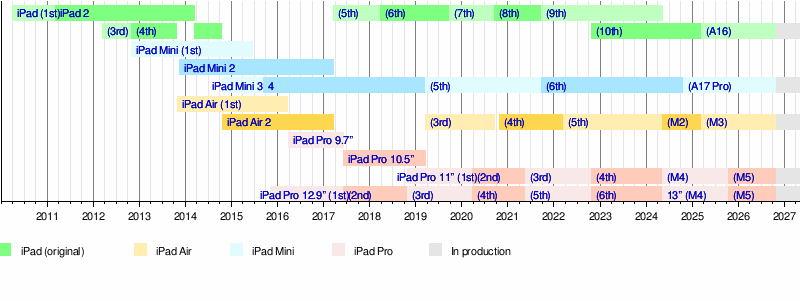 |
Source: Apple Newsroom Archive.
See also
- Pen computing
- Graphics tablet