Digital camera facts for kids


A digital camera, also known as a digicam, is a special kind of camera. Instead of using film, it captures pictures and videos using digital memory. Most cameras made since the early 2000s are digital. They have largely replaced older cameras that used photographic film.
Many digital cameras are now built into smartphones and other mobile devices. However, professional photographers still use dedicated, high-quality digital cameras.
Digital cameras use a lens to focus light, just like film cameras. A part called the diaphragm and a shutter control how much light reaches the sensor. The big difference is that digital cameras use an electronic sensor to capture the image, not chemicals on film.
You can see your photos right away on a screen after taking them. You can also store and delete pictures from the camera's memory. Many digital cameras can also record videos with sound. Some even let you edit pictures directly on the camera!
Contents
- The Story of Digital Cameras
- How Digital Cameras See: Image Sensors
- Different Kinds of Digital Cameras
- Compact Cameras: Easy to Carry
- Rugged Compact Cameras: Built Tough
- Action Cameras: For Adventure!
- 360-Degree Cameras: See Everything
- Bridge Cameras: Look Like DSLRs
- Mirrorless Interchangeable-Lens Cameras
- Modular Cameras: Mix and Match
- Digital Single-Lens Reflex Cameras (DSLR)
- Fixed-Mirror DSLT Cameras
- Cameras in Other Devices
- Who Makes Digital Cameras?
- What's Happening in the Camera Market?
- Connecting Your Camera
- Toughness and Protection
- Camera Modes and Settings
- Storing Your Pictures
- Camera Power: Batteries
- Old Film Cameras and Digital
- Images for kids
- See also
The Story of Digital Cameras
- Further information: History of the camera#Digital cameras
How Digital Cameras Began
The idea for digital cameras started a long time ago. In 1969, scientists Willard S. Boyle and George E. Smith invented the charge-coupled device (CCD). This was a very important step for capturing images electronically. Later, in 1985, a team at Olympus created a different type of sensor called the NMOS active-pixel sensor. This led to the CMOS sensor, which NASA developed in 1993.
In the 1960s, a scientist named Eugene F. Lally thought about using tiny sensors to take digital pictures in space. He wanted to help astronauts know where they were by photographing planets and stars. The technology needed to catch up with his big ideas!
Early Digital Imaging
In 1972, the Landsat 1 satellite began taking digital pictures of Earth from space. It used a special scanner designed by Virginia Norwood. This scanner captured image data in different colors and infrared light. For six years, it sent over 300,000 digital photos of our planet.
Also in 1972, Thomas McCord and James Westphal created a digital camera for use with telescopes. It could store 256x256 pixel images of planets and stars on magnetic tape. These early cameras used special detectors and needed to be cooled with dry ice for long exposures.
First Commercial Digital Cameras
The first all-digital camera sold to the public was the Cromemco Cyclops in 1975. It used a simple 32x32 pixel sensor. Around the same time, Steven Sasson at Kodak built his own electronic camera using a CCD sensor.
In 1981, Sony showed off the first filmless SLR camera, the Sony Mavica. It recorded analog video signals onto a special floppy disk. This was a big step towards cameras that didn't need film.
Fujifilm introduced the FUJIX DS-1P in 1988. This was the first truly digital camera that saved images onto a semiconductor memory card. It could hold up to ten photos. In 1989, Fujifilm released the FUJIX DS-X, the first digital camera sold commercially.
The Rise of Camera Phones
The first commercial camera phone was the Kyocera Visual Phone VP-210, released in Japan in May 1999. It had a small front-facing camera and could store 20 digital images. You could send these pictures by email or over the phone network.
In June 2000, the Samsung SCH-V200 came out in South Korea. It also had a built-in camera. The first camera phone for everyone was the J-SH04 by Sharp, sold in Japan in November 2000. It could send pictures instantly using cell phone service. By the early 2010s, almost all smartphones had a built-in digital camera.
In the early 2020s, older digital cameras from the 2000s became popular again. This was a TikTok trend, with many young people enjoying the look and feel of these "Y2K aesthetic" cameras.
How Digital Cameras See: Image Sensors


Digital cameras use special parts called image sensors to capture light and turn it into a picture. The two main types are CCD and CMOS sensors. Think of them as tiny grids of light detectors.
- A CCD sensor has one main amplifier for all its tiny light detectors, called pixels.
- A CMOS sensor gives each pixel its own amplifier. This means CMOS sensors often use less power.
The way a camera processes the image after the sensor captures it is very important. This image processing often affects the final picture quality more than the type of sensor itself.
Pixels and Resolution
The resolution of a digital camera tells you how much detail it can capture. This is usually limited by the image sensor. The brighter a spot on the sensor, the higher the value recorded for that tiny point, or pixel.
Many sensors use a color filter array (like a tiny checkerboard of red, green, and blue filters) to capture color. The camera then uses a process called demosaicing to create a full-color image.
The number of pixels on the sensor determines the camera's "pixel count". If a sensor has 1,000 pixels across and 1,000 pixels down, it has 1,000,000 pixels, or 1 megapixel. More megapixels usually mean more detail in your photos.
Choosing Resolution Options
Most cameras let you choose a lower resolution for your pictures. This makes the file size smaller, so you can store more photos on your memory card. It's useful when you don't need super-high detail, like for quick snapshots.
Making Images Sharp
An image's sharpness means how clear and detailed it looks. Many things affect sharpness, like the camera's ISO setting, the lens, and how much light is available.
- A higher ISO setting helps in low light but can make the image look grainy or less sharp.
- The lens and its settings also play a big role in how sharp your photos turn out.
How Cameras Capture Color

Most current consumer digital cameras use a special pattern of color filters on their sensor, called a Bayer filter. This filter helps the camera "see" colors. It's like having tiny red, green, and blue glasses over different pixels.
The camera's internal software then uses this information to figure out the full color for each pixel, creating a complete color image.
Sensor Size and What You See


Digital camera sensors come in different sizes. A smaller sensor will "crop" your view compared to a larger sensor, even with the same lens. This means you see less of the scene.
This "crop factor" is often compared to traditional 35mm film. Cameras with larger sensors, like those in professional DSLRs, capture a wider view and often perform better in low light.
| Type | Width (mm) | Height (mm) | Size (mm²) |
|---|---|---|---|
| 1/3.6" | 4.00 | 3.00 | 12.0 |
| 1/3.2" | 4.54 | 3.42 | 15.5 |
| 1/3" | 4.80 | 3.60 | 17.3 |
| 1/2.7" | 5.37 | 4.04 | 21.7 |
| 1/2.5" | 5.76 | 4.29 | 24.7 |
| 1/2.3" | 6.16 | 4.62 | 28.5 |
| 1/2" | 6.40 | 4.80 | 30.7 |
| 1/1.8" | 7.18 | 5.32 | 38.2 |
| 1/1.7" | 7.60 | 5.70 | 43.3 |
| 2/3" | 8.80 | 6.60 | 58.1 |
| 1" | 12.8 | 9.6 | 123 |
| 4/3" | 18.0 | 13.5 | 243 |
| APS-C | 25.1 | 16.7 | 419 |
| 35 mm | 36 | 24 | 864 |
| Back | 48 | 36 | 1728 |
Different Kinds of Digital Cameras
Digital cameras come in many shapes, sizes, and with different features.
Compact Cameras: Easy to Carry


Compact cameras are small and easy to carry, often fitting in your pocket. They are perfect for quick "snapshots" and everyday photos. These are often called "point-and-shoot" cameras.
Most compact cameras have a lens that can zoom in and out. A cover usually protects the lens when it's off. They are designed to be simple to use, often with an "auto mode" that sets everything for you.
Compact cameras usually have small sensors, which helps them stay tiny. They often save pictures as JPEG files. Most have a built-in flash for close-up subjects. You frame your photos using the screen on the back. Many can also record video.
Some compact cameras have special features like macro mode for close-ups or zoom lenses that can zoom up to 30 times. Some even have GPS to record where you took the picture.
Rugged Compact Cameras: Built Tough
Rugged compact cameras are made to handle tough conditions. They can be waterproof, freeze-proof, shockproof, and even crushproof. This means you can take them swimming, skiing, or on rough adventures.
Some are waterproof up to 100 feet (30 meters)! They often have video recording and image stabilization to help keep your shots steady.
Action Cameras: For Adventure!
GoPro and other brands make action cameras. These are rugged, small, and can be attached to helmets, bikes, or your arm. They usually have a wide-angle lens and are great for capturing videos and photos of exciting activities.
360-Degree Cameras: See Everything
A 360-degree camera can take pictures or videos all around you. They often use two lenses facing opposite directions to capture the entire scene at once. You can then view these photos or videos in a virtual reality mode.
Bridge Cameras: Look Like DSLRs

Bridge cameras look a lot like DSLRs but usually have a fixed lens and a smaller sensor, similar to compact cameras. They offer some advanced features but are often easier to use than a full DSLR.
They use the screen for framing images and have autofocus. Their larger size compared to compacts allows for powerful superzoom lenses, sometimes zooming over 60 times! Many have image stabilization to help with blurry photos.
Bridge cameras are a good choice if you want a camera that looks and feels professional but is more portable and less expensive than a DSLR.
Mirrorless Interchangeable-Lens Cameras

.jpg)
These cameras are a newer type that became popular in the late 2000s. They are called "mirrorless" because they don't have the moving mirror found in DSLRs. This makes them simpler and more compact.
Instead of an optical viewfinder, you see your image preview on the back LCD screen or an electronic viewfinder (EVF). Mirrorless cameras let you change lenses, just like DSLRs, and come with various sensor sizes. Some even have full-frame sensors, like professional DSLRs.
Modular Cameras: Mix and Match

Modular cameras let you change parts like the lens and sensor. Some are called "lens-style" cameras. These are like a camera inside a lens shape. They connect wirelessly to your smartphone, which acts as the screen and controls.
Sony's Cyber-shot QX series and Kodak PixPro smart lens cameras are examples. They let your phone take much higher quality pictures than its built-in camera.
Digital Single-Lens Reflex Cameras (DSLR)

DSLRs are popular with serious photographers. They have a special mirror inside that reflects light from the lens up to an optical viewfinder. When you press the shutter, the mirror moves out of the way, and the sensor captures the image.
DSLRs have large sensors, often called "full-frame sensors," which are great for low light and creating blurry backgrounds. You can also change lenses on a DSLR, giving you many creative options.
Fixed-Mirror DSLT Cameras
Cameras with fixed semi-transparent mirrors, also known as DSLT cameras, are like DSLRs but their mirror doesn't move. Instead, it lets some light go to the image sensor and reflects some to an autofocus sensor.
This design means you don't have a "blackout" moment in the viewfinder when taking a picture, which is common with DSLRs. DSLT cameras are great for fast action and video because they can keep focusing continuously.
Cameras in Other Devices
Many devices now have digital cameras built-in. This includes smartphones, mobile phones, and laptop computers. These cameras usually save images in the JPEG or HEIC format.
Camera phones first appeared in Japan in 2001. By 2003, they were selling more than stand-alone digital cameras. By 2007, more than half of all mobile phones had a camera. This led to a decline in sales of separate digital cameras.
Who Makes Digital Cameras?
Many companies make digital cameras, especially DSLRs. Each brand often has its own special features or focus. Some are known for their image quality, while others focus on camera design or specific systems.
What's Happening in the Camera Market?

Sales of traditional digital cameras have changed a lot because so many people use smartphones for photos. Smartphones make it easy to edit and share pictures using apps and online services.
However, bridge cameras and DSLRs still offer features that most smartphone cameras don't, like powerful optical zoom and interchangeable lenses. Mirrorless cameras have also become very popular, offering similar quality to DSLRs in a smaller size.
Some phone makers have even created smartphones with very advanced cameras. For example, the Huawei P20 Pro, released in 2018, had three Leica lenses and a 40-megapixel sensor. These phones tried to combine the best of both worlds.
Sales of digital cameras have been declining since 2011. In 2015, only about 35 million digital cameras were sold, much less than their peak in 2010.
Connecting Your Camera
Transferring Photos
You can connect most digital cameras directly to a computer to move your photos.
- Older cameras used a PC serial port. Today, USB is the most common way. Many cameras act like a USB storage drive.
- Some cameras use wireless connections like Bluetooth or Wi-Fi. You can also get Wi-Fi memory cards that send photos to your computer or smartphone.
- Many cameras with Wi-Fi let you control them from a smartphone app, like releasing the shutter or changing settings.
- Camera phones often use cellular networks to share images, usually through MMS or email.
Another easy way to transfer photos is using a card reader. This device plugs into your computer and reads your camera's memory card directly. It's often faster and saves your camera's battery.
Printing Photos
Many modern cameras support a standard called PictBridge. This lets them connect directly to a PictBridge-compatible printer to print photos without needing a computer.
Wireless connections can also be used to print photos without cables.
An instant-print camera is a digital camera with a printer built right in. It's like the old instant cameras that used instant film, but it prints digital photos right away.
Displaying Photos
Many digital cameras have a video output port. You can connect them to a TV, usually with an sVideo or HDMI cable, to view your photos on a bigger screen. You can even create a "slide show" directly from your camera.
Some DVD recorders and TVs can read memory cards from cameras.
Toughness and Protection
Cameras can have different levels of protection against the environment.
- Some are "weather-sealed" to protect against splashes, humidity, dust, and sand.
- Others are completely "waterproof" to a certain depth, allowing for underwater photography. Many waterproof cameras are also shockproof and can handle cold temperatures.
You can also buy special waterproof housings for some cameras to take them even deeper underwater.
Camera Modes and Settings
Many digital cameras have preset modes for different situations. These modes automatically adjust settings like exposure, aperture, focusing, and white balance to help you get the best shot.
For example, a "landscape mode" might make sure everything in a wide scene is in focus. A "sports mode" would use a faster shutter speed to freeze action and prevent blurry photos of moving subjects. Some cameras can even pick the best scene mode for you using artificial intelligence.
Some cameras also have a voice note feature, letting you record short audio notes with your pictures.
Storing Your Pictures


Most camera phones and stand-alone digital cameras save pictures onto flash memory cards. The most common type is the SD format. Other types include CompactFlash and CFexpress. In 2012, a faster XQD card format was introduced.
Some high-end cameras have two memory card slots, so you can use two cards at once. Your camera usually shows you how many photos you can still take before the memory card is full.
Early digital cameras sometimes used other storage, like tiny Microdrives (small hard drives) or even 3.5" floppy disks.
-
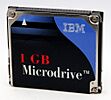
Microdrive (CF-II)
-

3.5" floppy disks
-
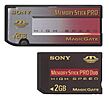
Sony's Proprietary Memory Stick


.jpg)

File Formats
The most common way to save image data is using the JPEG format. Other types include TIFF, HEIF, and various Raw formats.
Raw files contain all the unprocessed data directly from the camera's sensor. They give you more flexibility to edit your photos later without losing quality.
For videos, common formats include AVI, MPEG, MOV, and MP4. MP4 is popular because it uses newer compression to record longer videos in the same space.
Most photos also include Exif data. This is like a digital tag that tells you details about the picture, such as the date and time it was taken, and sometimes even the location.
Camera Power: Batteries
Digital cameras need batteries to work. As cameras got smaller, batteries also needed to become smaller and more powerful.
Special Camera Batteries
Most digital cameras use special batteries made just for them by the manufacturer. These are almost always lithium-ion batteries. You can often buy replacement batteries from other companies too.
Standard Batteries
Some digital cameras use common batteries you can buy in stores, like AA batteries. These cameras can usually use both disposable and rechargeable versions. Some professional DSLRs also have battery grips that can hold AA batteries as an extra power source.
Old Film Cameras and Digital

When digital cameras first became popular, many photographers wondered if they could turn their old film cameras into digital ones. For most 35mm film cameras, this wasn't really possible. It would be too difficult and expensive to change them.
However, some professional film cameras, especially medium and large format ones, were designed to be modular. For these, companies did create special "digital backs" that could replace the film part, turning them into digital cameras. These digital backs were very expensive and mostly used by studios.
Images for kids
-

A San Francisco cable car, imaged using a special camera with a very fast shutter speed.

See also
 In Spanish: Cámara digital para niños
- List of digital camera brands
- Computational photography
- Digital signal processor
- DigitaOS
- Image sensor
- Magic Lantern (firmware)
- Pixel shift
- Smart camera
- Video camera
- Vision processing unit